Candidate Feedback After Interview
After completing the interview, the candidate can leave a brief review: a star rating (1 to 5) and a text comment. Feedback helps quickly identify issues with templates, questions, and the interview process.
What the Candidate Sees
After the interview ends, the final screen displays a block with a Share your feedback button.
Clicking the button, the candidate sees a form with two fields:
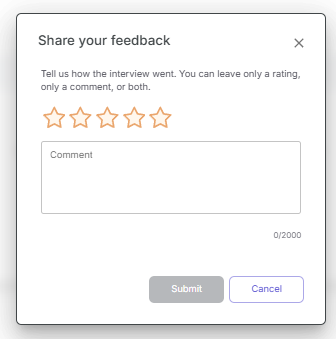
- Rating — 1 to 5 stars.
- Comment — text up to 2000 characters.
The candidate can fill in only the rating, only the comment, or both fields. An empty form cannot be submitted. Feedback cannot be submitted again for the same interview.
How to View Feedback in the Overview Section
The interview table displays a column with feedback data: the rating and an indicator showing whether a comment is present.
To read the full comment text, open the interview details.
Filtering and Sorting by Feedback
In the Overview section, the following options are available:
- Filter by rating value.
- Sort by rating — from best to worst or from worst to best.